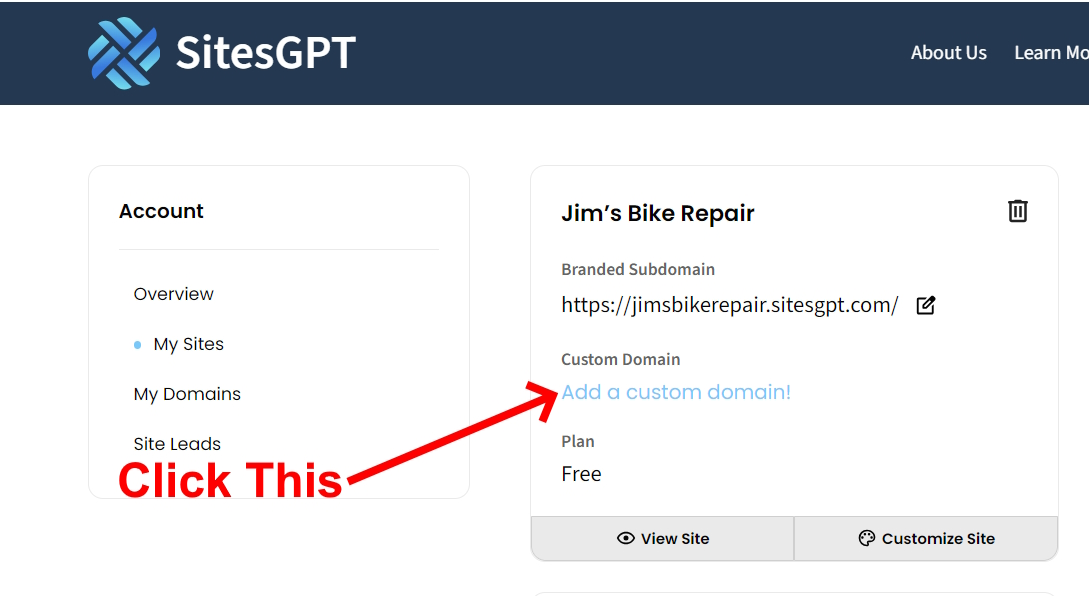
To use your existing domain with your SitesGPT website, follow these steps:
1. Make sure you are logged into your account. Go to this page:
https://www.sitesgpt.com/account/sites
2. Look for the button labeled “Add a Custom Domain”. (See attached screen shot.) Click this.
3. Click “I already have a domain” and enter it.
4. Once you enter your domain and press Submit, you will be prompted to log into the account where you purchased your domain. Enter the user name and password of your domain provider’s account.
5. Once you are logged into your domain provider account, SitesGPT will automatically connect your domain to your website.
By completing these steps, the website will go live on your domain. Allow up to 24-hours for processing.
Let us know if you have any further questions.