To add a booking feature to your website, you will first need to create the booking “widget”, which will generate a code that you will place in your site settings under “custom scripts”. Here is the link to create your free booking widget. After you create the widget, copy the code it gives you, then follow the instructions below to paste the code into your website:
FREE BOOKING WIDGET FOR YOUR WEBSITE
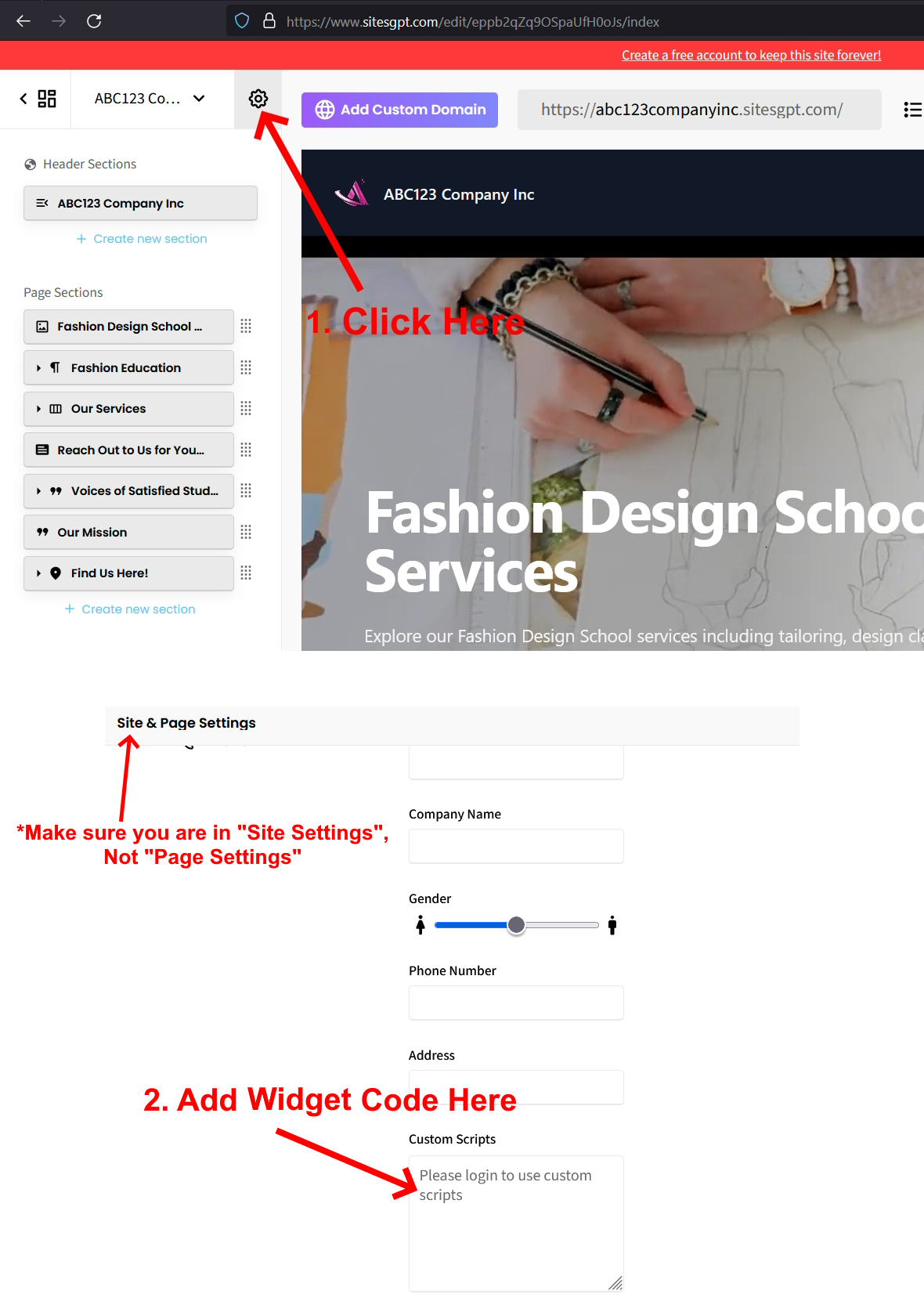
To add the widget code to your website, follow these steps:
1. When you are on the website editor screen, look for the small gear icon at top of the left sidebar. Click that.
2. Click on “Site Settings” tab on the top.
3. Look for the “Custom Scripts” section.
4. Paste your widget code into the “Custom Scripts” area.
5. Save changes to activate the booking widget.
*See attached screen shots.
Follow these steps and the “Book Now” feature will come to life on your website.
Let us know if you run into any issues or other questions.
SitesGPT Support Team