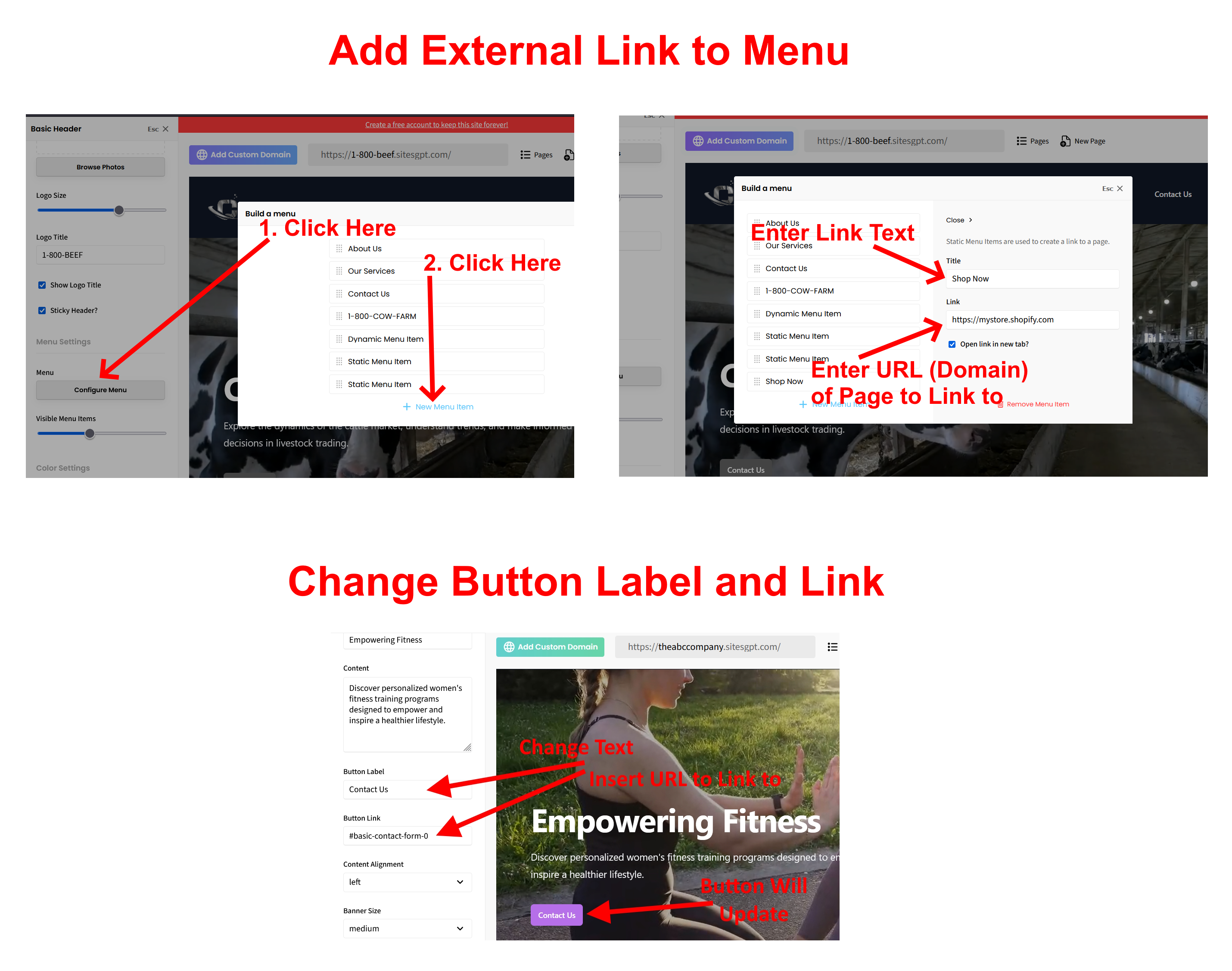
The easiest way to link your SitesGPT website to your Shopify store is to add links to your header and footer menu. Here is how to do that:
1. Find the URL (domain) of your Shopify store or products page. Copy that URL.
2. In the SitesGPT website editor, click on the header section. The sidebar editor will open on the left. From there, look for the button “Configure Menu”. Click that button. Then select, “New Menu Item” Then select “Static Menu Item”. From there you will be able to create the text for the link (“Title” field) and paste the URL of your Shopify store into the “Link” field. Most user will use “Shop Now” or “Product Catalog” for the Title of this button.
3. To add the Shopify link to your footer menu: in the site editor, click on the footer, click the “Configure Menu” button, and follow the same process as described in #2 above.
4. You can also link out to your Shopify store by changing the Button Label and Button Link for the “Contact Us” button in the Hero Banner section (the section with large video or image at top.) Click on that section, look for “Button Label” / “Button Link” in the left sidebar editor. From there you can change the button Title to “Shop Now” and change the button Link to your Shopify page URL.
Please see attached screenshots for clarification. Let us know if you have any other questions or concerns.